Introducing  ✦  The Master Station & WebTools

The Conductor / Sequencer

Every motor talking. Every group in sync — with each other, and with the clock.
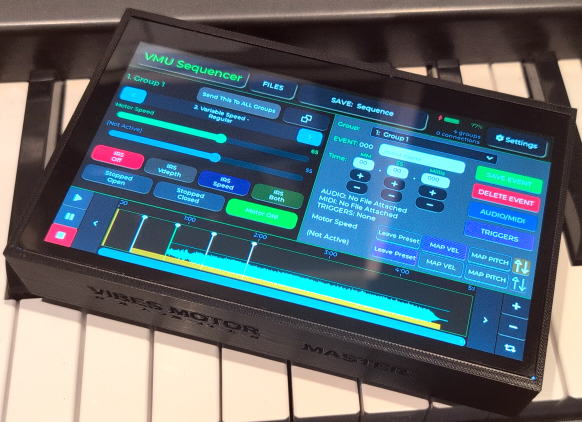
Master Control Device
Vibes Motor Unlimited Master Control touchscreen device

A dedicated 7" touchscreen that stands on its own — no laptop, no venue Wi-Fi, no internet connection required. It serves its own network and runs on battery. A full group coordinator and sequencer with audio/MIDI playback that puts every group, every program, and a full MIDI trigger engine right at your fingertips on stage. Supports any generic USB MIDI keyboard or controller.

  • Standalone Touchscreen
  • Serves Its Own Wi-Fi
  • Runs On Battery
  • USB Flash Drive Slot
  • Generic USB MIDI In / Out
WebTools — In Your Browser
Vibes Sequencer WebTools running in a laptop browser

The same Conductor and Sequencer experience, running as web pages — Vibes Conductor and Vibes Sequencer — in a recent version of Chrome or Edge. Build complex sequences and MIDI trigger maps on a full-size screen with a mouse and keyboard, then carry your files over to the device on a USB stick.

  • Runs In Chrome or Edge
  • Full Keyboard & Mouse Editing
  • Same MIDI Triggers & Mapping
  • File-Compatible With Device
  • No Extra Hardware Needed
Where It Fits

Two Layers. One System.

Every Vibes Motor Unlimited controller — V1, V2, V2 BT Micro, and V3 — mounts directly on an instrument and drives its motor. The Conductor / Sequencer is different: it doesn't drive anything itself. It's the remote command station that talks to those controllers, singly or as coordinated groups, over its own Wi-Fi network — and now, thanks to WebTools, that same command station also runs in an ordinary browser.

Layer One

The Motor Controllers

V1 · V2 · V2 BT Micro · V3 — one per instrument, mounted on the frame, driving that instrument's motor directly. Each one can be controlled by its own panel, a phone app, or now — the Conductor.

Layer Two

The Conductor / Sequencer

The master station. Runs on its own 7" touchscreen device, or as WebTools in a Chrome or Edge browser — reaching every controller in the room, live or on a pre-built timeline, coordinated into groups of any size.

One Brain. Two Screens.

Meet WebTools

Everything the Master Unit's touchscreen can do, Vibes Conductor and Vibes Sequencer can do too — as web pages, running in a recent version of Chrome or Edge on a laptop, tablet, or desktop computer. Same groups, same programs, same MIDI mapping, same triggers, and a full-size screen and keyboard that make building a complex sequence even easier. (A few features, including MIDI, rely on capabilities specific to those two browsers, so we recommend keeping one of them up to date.)

Best of all, the two worlds are fully file-compatible. Build a sequence or a full group setup on your laptop at home, save it to a USB flash drive, then plug that drive straight into the Master Unit and open the file exactly as it was saved — no conversion, no re-entry, no compromise. Work the other way too: save a session on the device, carry the drive to your laptop, and keep refining it on the big screen.

Two Modes. Two Screens. Tap the Title to Switch.

Conductor Mode & Sequencer Mode

Conductor = you drive the motors live, in both directions. Sequencer = the timeline drives the motors on a fixed schedule, one direction only. Your group setups are remembered separately for each mode, so switching between them never disturbs the other — and every screen below looks and behaves identically whether it's the Master Unit's touchscreen or a browser tab.

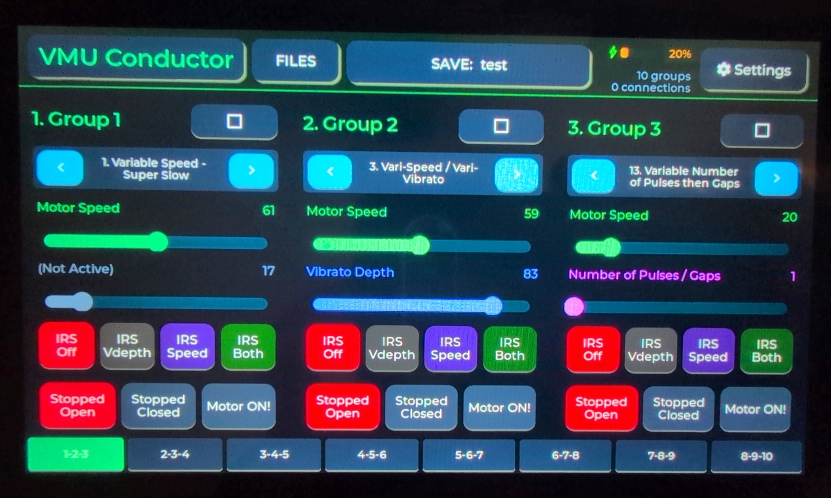
VMU Conductor mode on the Master Unit touchscreen
Master Unit Touchscreen
Conductor Mode — On Device

Think of it as a live mixing desk for your motors. Set each group's program, speed, depth, run state and IR sensor mode — every instrument follows immediately.

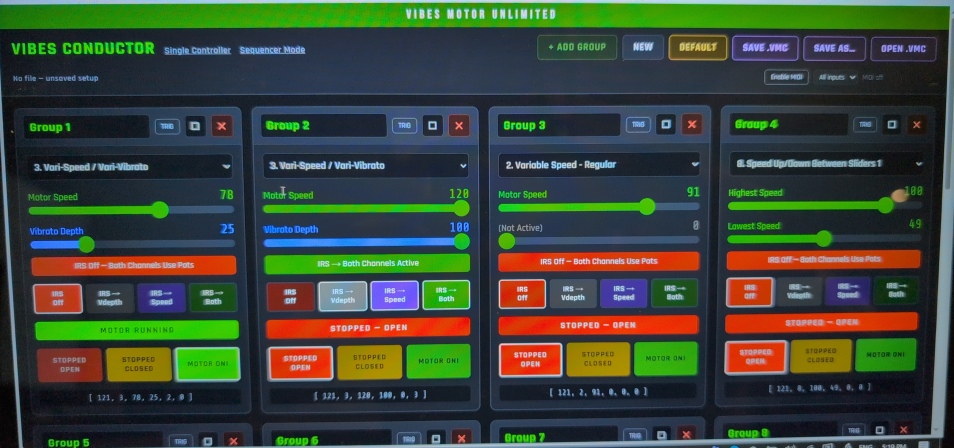
Vibes Conductor WebTool running in a browser
Vibes Conductor — WebTools
Conductor Mode — In Browser

The identical control surface, laid out for a big screen. Control flows both ways: when any player adjusts their own controller, it takes the lead for the whole group — from the device or the browser alike.

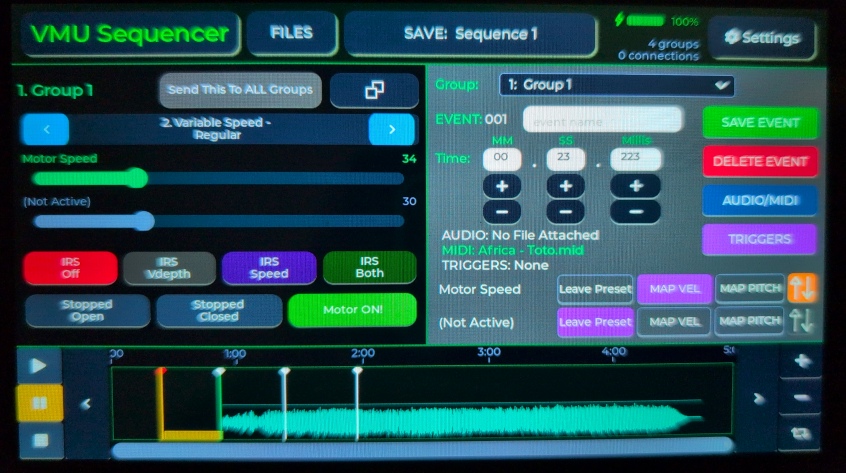
VMU Sequencer mode on the Master Unit touchscreen
Master Unit Touchscreen
Sequencer Mode — On Device

Build a timeline in advance. Place events at exact moments — each one a full snapshot of every group's settings, with an optional audio clip or MIDI file attached.

Vibes Sequencer WebTool running in a browser
Vibes Sequencer — WebTools
Sequencer Mode — In Browser

Build and fine-tune a full timeline with a mouse and keyboard instead of a touchscreen — then save it to a flash drive and press play from the Master Unit on stage.

The Big One

Play It Like an Instrument

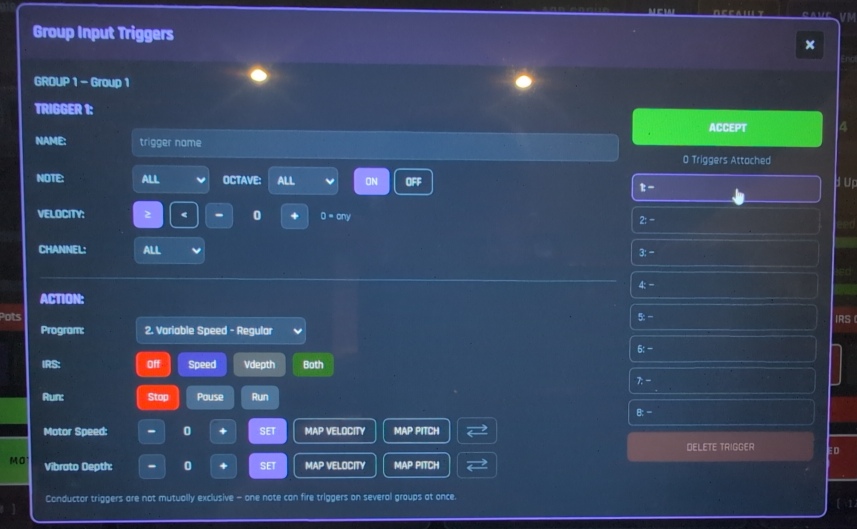
Plug a standard USB MIDI keyboard straight into the Conductor / Sequencer, and it stops being just a remote control — it becomes a genuinely musical instrument in its own right. Incoming notes can trigger controller states, jump the sequencer timeline, or map live performance data directly onto the motors.

Group Input Triggers configuration on the Master Unit touchscreen

On the Master Unit — Sequencer Triggers

Group Input Triggers configuration dialog in Vibes Conductor WebTools

In Vibes Conductor WebTools — the identical dialog

Two Ways to Run the Show

Built for the Real Venue — Or the Rehearsal Room

The Master Unit needs nothing but itself. WebTools needs nothing but a browser. Pick whichever suits the moment — or use both, on the same files, at different stages of getting ready.

The Master Control Device
Own Wi-Fi Network
Serves its own access point — every motor controller and phone app connects directly. No venue internet required.
Built-In Battery
A flatpack Li-ion cell with full monitoring — charge status shown live on every screen, right down to voltage.
Stereo Audio Output
Dedicated high-quality audio out, driving headphones or line-level output for perfectly synced playback.
USB Flash Drive Support
Import and back up audio, MIDI, and sequence files fast — mount a drive right on the Files page.
Generic USB MIDI Support
Plug in any standard USB MIDI keyboard or controller — no proprietary adapter or special hardware required.
Up to 10 Groups
One instrument per group, or many — mix and match. A row of vibes moves as one, or every instrument stands alone.
15 Built-In Programs
From steady vibrato sweeps to pulsing gaps to the new pedal-triggered delayed vibrato — every program, every group.
Save & Load Everything
Full sequences, live baselines, and group configurations all save to internal storage, SD card, or USB.
Adjustable Brightness
Auto-dimming screen with configurable brightness levels and timeout — easy on the eyes during long sets.
WebTools — In Chrome or Edge
No Extra Hardware
Runs on the laptop or tablet you already own — using its screen, its keyboard, and its own battery.
Flexible Networking
Works over venue Wi-Fi, a home network, or an offline hotspot — though MIDI features need the page served securely over HTTPS.
Full Keyboard & Mouse
Build sequences and MIDI trigger maps faster with proper typing and precise clicks instead of a touchscreen.
Multiple Windows Open
Reference Vibes Conductor and Vibes Sequencer side by side, or run several browser tabs at once.
Same Groups, Same Programs
Every group, every one of the 15 built-in programs, identical logic to the device — nothing lost in translation.
File-Compatible via USB
Save a sequence or setup from WebTools, carry it over on a flash drive, and open it exactly where you left off on the Master Unit.
You're In Control of Updates
WebTools files live on your own server — nobody else controls your motor network. When new features are released, download and upload the updated files whenever you're ready.
Perfect for Pre-Production
Build and rehearse an entire show at your desk, days before you ever touch the Master Unit on stage.

"Any member of a group can be in control of the whole group at any moment — the person who last moved a control leads it. This is a room full of instruments that finally think as one."

— Jim McCarthy · Designer · Vibes Motor Unlimited
Coming Soon

The Master Station for Your Whole Ensemble

The Conductor / Sequencer is currently in final testing alongside the full V1–V3 controller range. Follow the story on the blog, or leave your email on the coming soon page to be notified the moment it's ready.

Latest Update